

1. Introduction
Lateral movement means to move within the internal network to access the organization’s target data and to exfiltrate the data. In this challenge you will solve tasks to detect lateral movement using Velociraptor.
From the previous task you know that someone exfiltrated the files from Domain Controller DC1 using the compromised Domain Administrator account ffast. In this task, we want to find out how the adversary compromised the Domain Administrator account ffast. You suspect that the attacker used the pass the hash technique with Psexec and mimikatz. Now it is your task to prove that.
2. Tasks
- Provide an Artifact that detects the execution of PsExec. The Artifact must show the first execution time of PsExec in date time format.
- Use Windows Event ID 4648 to find out the user that executed PsExec to become Domain Administrator ffast on destination computer (i.e. DC1). Provide an Artifact for this purpose. It should show at least the parameters SubjectUserName, TargetUserName, TargetServerName and LogonTime (in date time format) from Windows Event ID 4648.
- In question 1 and 2 you found some timestamps in date time format. Do a temporal correlation with them. And reason if they could relate to each other.
- Use Windows Event ID 4624 to find the user that executed PsExec to become Domain Administrator ffast on the source computer. Provide an Artifact for this purpose. It should show at least the parameters IpAddress (of the source), TargetUserName and LogonType from Windows Event ID 4624.
- Find out if mimikatz was executed using Velociraptor and Amcache.
Pass the hash (PtH) is a method of authenticating as a user without having access to the user’s cleartext password. This method bypasses standard authentication steps that require a cleartext password, moving directly into the portion of the authentication that uses the password hash. In this technique, valid password hashes for the account being used are captured using a Credential Access technique. Captured hashes are used with PtH to authenticate as that user. Once authenticated, PtH may be used to perform actions on local or remote systems. Source: https://www.corelight.com/mitre-attack/lateral-movement/t1075-pass-the-hash/
3. Solution
- To find out if PsExec was executed we’ve allready learned from the previous exercise that velociraptor provides a nice artifact called
Windows.Registry.Sysinternals.Eulacheck. It is described as follows:
Checks for the Accepted Sysinternals EULA from the registry key HKCU\Software\Sysinternals[TOOL].
When a Sysinternals tool is first run on a system, the EULA must be accepted. This writes a value called
EulaAccepted under that keyAn important side note is that this artifact uses HKEY_USERS and therefore will not detect users that are not currently logged on!
I used the Sysinternals artifact against all the 4 systems in the lab expect my forensic client:
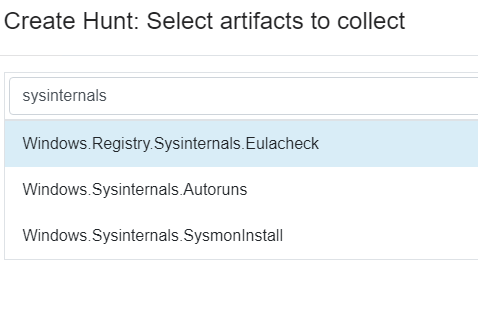
I got no result back 🙁
As mentioned in the description of the Artifact Windows.Registry.Sysinternals.Eulacheck, it does not
show any entries for not currently logged in users. This was a problem, as the Local Admin ladmin would not be logged in at the time of the investigation and thus the registry entry in question would not be shown.
Let’s try to use a custom Amcache Artifact and search for psexec:

PSexec was executed on FS1
Path of execution:
C:\Windows\Temp >file:///C:/Windows/appcompat/Programs/Amcache.hve#%5CRoot%5CInventoryApplicationFile%5Cpsexec64.exe%7C54fa81f597cacdc4

-
- The SANS Poster Hunt Evil also lists that when PsExec is executed, a Windows Event with
ID 4648is logged if alternate credentials were specified. Velociraptor provides an artifact which we can use to search for specific logon ID’s.
- The SANS Poster Hunt Evil also lists that when PsExec is executed, a Windows Event with

Let’s use the artifact Windows.EventLogs.AlternateLogon to search for EventID 4648

Result from hunt on FS1:
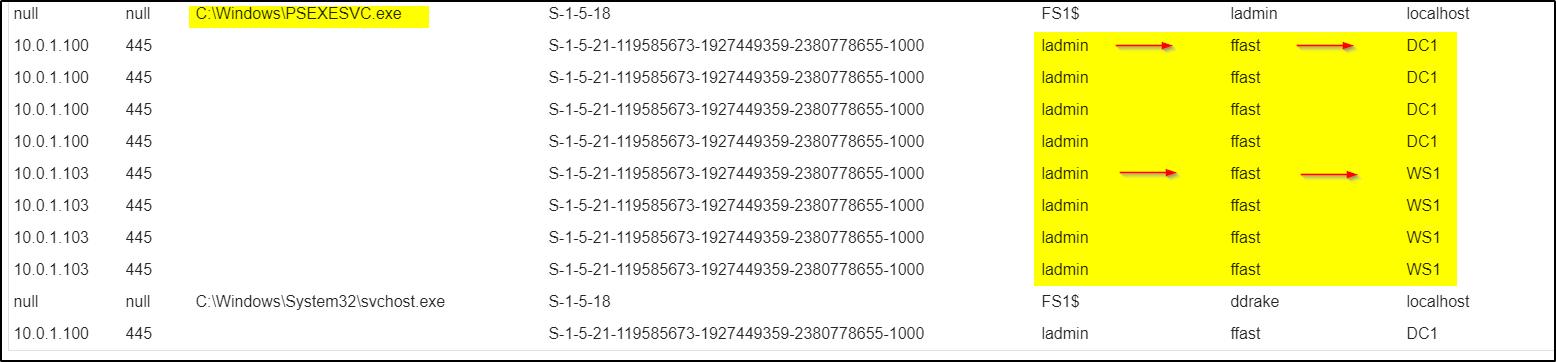
ladmin becomes ffast
Results from Client 1

aalfort becomes ladmin
- As mentioned above the artifact
Windows.Registry.Sysinternals.Eulacheckdoes not give sufficient results.
The reason for this is pretty sure that the Artifact is looking in the registry and the corresponding entries are
not there. This can be because the attacker deleted these entries to hide his activities. - Search for EventID 4624On the destination side another Event 4624 will be logged. For the further investigation we can use the same artifacte and modify it by replacing the
ID 4648with4624

Results on FS1

login as ladmin
- Mimikatz detectionMimikatz was executed on FS1Used Artifact:
Custom.Windows.Cybercop.mimikatz/AmCache

Path of Execution:
C:\Windows\Temp\mimikatz.exe file:///C:/Windows/appcompat/Programs/Amcache.hve#%5CRoot%5CInventoryApplicationFile%5Cmimikatz.exe%7C9a39181795af917
