

1. Introduction
- An unknown USB Stick was found at the desk of an employee of your company.
- The employee and his coworkers found the USB Stick to be suspicious, since when the worker plugged it into his computer, nothing showed up.
- Another analyst has already created an image of the found stick using dd and made it available to you under RESOURCES.
Your Task:
- Describe how you retrieved the flag.
- Describe why nothing showed up on when the USB Stick was inserted by the employee.
- Describe what has likely happened to the USB Stick.
- Make a provable statement on whether the USB Stick is likely malicious or not.
- Make a statement on how the employee who found the USB Stick should remediate the situation and how he should handle similar situations in the future.
- State why or why not file carving is useful in this scenario.
BONUS: There is a really simple way in order to just retrieve the flag from the image. Can you describe it?
2. Answers
First I did analyse the dd image with testdisk.
It quickly found a FAT32 partition.

Testdisk was able to restore the partition and write out a new image.


After that it was possible to mount the image.
mount -o loop,ro image.dd /mnt/usb_image/

Retrieve the flag:
cat ThisIsTheFile.txt

There was no valid partition table on the stick, therefore nothing showed up after inserting the USB stick. (Image shows file info before and after the repair)
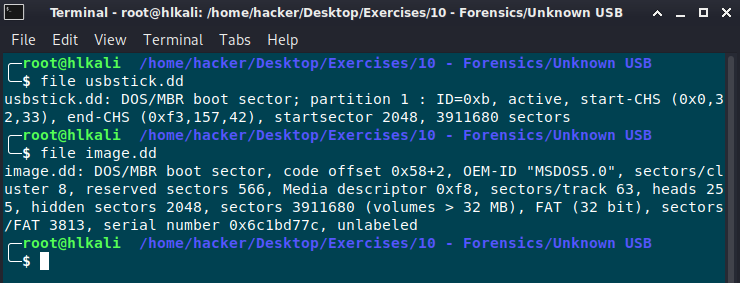
Maybe the USB was erased with a quick format. There are a lot of 0000 0000 0000 sectors. (See image below)

No malicious files found:

Start an awareness campaign for your employees. Never trust an orphaned USB Stick even it’s a gift from santa claus!!!

I’d prefere a file carving technique in case of the partition isn’t restorable anymore.
Bonus:
Command strings can be used to also find the flag!
