Assignment Series A4# Journeyman’s Piece
Part 2 – Regex

Project Idea
On a windows Domaincontroller we can find security logs with Event ID 4740. With that ID we can find out which user accounts are getting locked out.

A sample of Event ID 4740 looks like this:
Information 22.12.2020 21:28:46 Microsoft-Windows-Security-Auditing 4740    User Account Management "A user account was locked out.

Subject:
    Security ID:        SYSTEM
    Account Name:       SERVER23$
    Account Domain:     DOMAIN
    Logon ID:       0x3E7

Account That Was Locked Out:
    Security ID:        domain\firstname.lastname
    Account Name:       firstname.lastname
I’ll try to write a short powershellscript that go through this logs and print only those usernames out that stands in ralation with Event ID 4740.
Regex Pattern:
^Information \d{2}\.\d{2}\.\d{4} .*? 4740 .*(?:\r?\n(?!Subject:).*)*\r?\nSubject:(?:\r?\n(?![^\S\r\n]*Account Name:).*)*\r?\n.*\b(Account Name:[^\S\r\n]*\w+)\$(?:\r?\n(?!Account).*)*\r?\nAccount.*(?:\r?\n(?![^\S\rn]*Account Name:).*)*\r?\n.*\b(Account Name:[^\S\r\n]*\S+)
Match the first line with a „date like“ pattern and the number 4740
^Information \d{2}\.\d{2}\.\d{4} .*? 4740 .*
Match the following lines that do not start with Subject:
(?:\r?\n(?!Subject:).*)*\r?\n
Match Subject: followed by matching all lines that do not start with Account name:
Subject:(?:\r?\n(?![^\S\r\n]*Account Name:).*)*\r?\n
Capture in group 1 matching Account Name: followed by the spaces and 1+ word chars for the name itself
.*\b(Account Name:[^\S\r\n]*\w+)\$
The same approach for the second part first matching Account, then till Account Name:
(?:\r?\n(?!Account).*)*\r?\nAccount.*(?:\r?\n(?![^\S\rn]*Account Name:).*)*\r?\n.*\b
Capture in group 2 matching Account Name: the spaces the account name part itself (using \S+ assuming it can not contain spaces)
(Account Name:[^\S\r\n]*\S+)
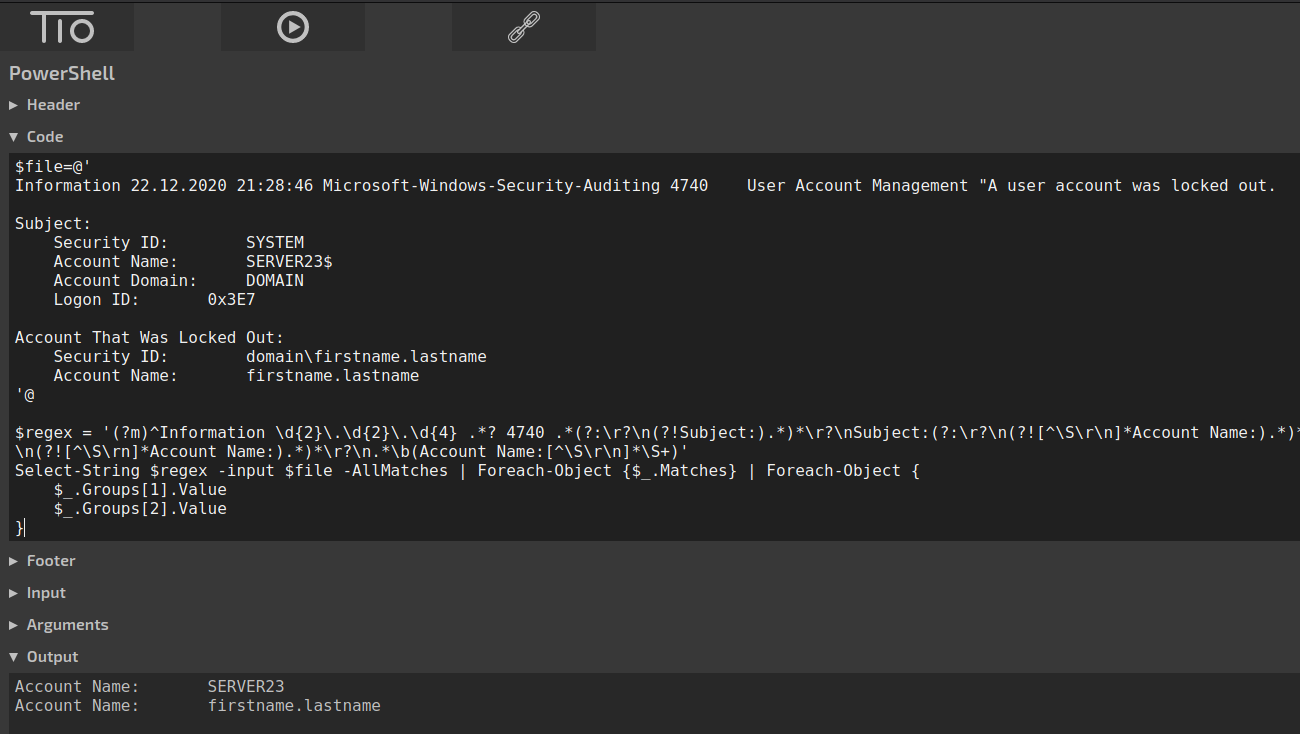
Powershell Script:
$file = Get-Content -Raw sample_log.txt

$regex = '(?m)^Information \d{2}\.\d{2}\.\d{4} .*? 4740 .*(?:\r?\n(?!Subject:).*)*\r?\nSubject:(?:\r?\n(?![^\S\r\n]*Account Name:).*)*\r?\n.*\b(Account Name:[^\S\r\n]*\w+)\$(?:\r?\n(?!Account).*)*\r?\nAccount.*(?:\r?\n(?![^\S\rn]*Account Name:).*)*\r?\n.*\b(Account Name:[^\S\r\n]*\S+)'
Select-String $regex -input $file -AllMatches | Foreach-Object {$_.Matches} | Foreach-Object {
    $_.Groups[1].Value
    $_.Groups[2].Value
}
Output:
Account Name:       SERVER23
Account Name:       firstname.lastname
Regex Demo:

https://regex101.com/r/DPG5BE/1
Powershell Emulator:
https://tio.run/#powershell