

Lab: Lateral Movement
Step 12 – Responder & NTLM Relaying
Teamwork – Team DaMa
Description
At this point of the lab, you have successfully elevated your privileges from a regular domain user to a domain administrator by abusing a combination of different vulnerabilities and techniques. However, would the same have been possible if we did not have access to a compromised user (tmassie) and client?
This exercise covers a different approach commonly exploited in Windows network, called NTLM Relaying.
Questions to Answer
Q1:
What does responder actually do under the hood?
A1:
If a windows client cannot resolve a hostname using DNS, it will use the Link-Local Multicast Name Resolution (LLMNR) protocol or NBT-NS to ask neighbouring computers. The responder tool can answer LLMNR and NBT-NS queries giving its own IP address as the destination for any hostname requested.
Reference:
Q2:
What does ntlmrelayx.py actually do under the hood?
A2:
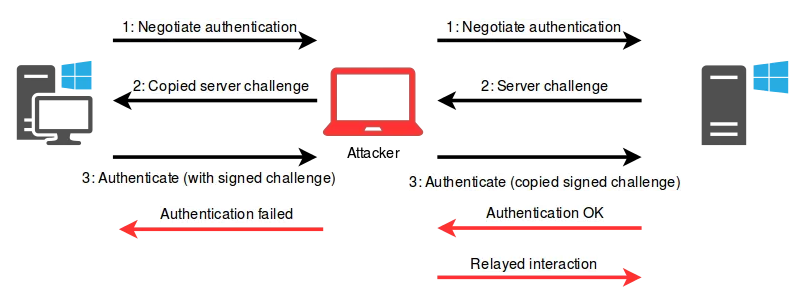
The ntlmrelayx.py tool performs the following steps.
- listen to the NTLM authentication negotiation messages from victim (man-in-the-middle position between a client and a server)
- send the negotiation messages to the server (acts as the client)
- interacts as the legitime client with the server for the authentication
- disconnects the connection with the victim
- dumps the contents of the SAM file (which contains the password hashes of local users)
Reference:
- https://en.hackndo.com/ntlm-relay/
- https://blog.fox-it.com/2017/05/09/relaying-credentials-everywhere-with-ntlmrelayx/
Q3:
Why can we impersonate the victims and inject malicious commands into the session we’re relaying?
A3:
Message Relaying:
As the attacker sent this same challenge to the real client, the real client encrypted this challenge with its secret, and responded with a valid response. The attacker can therefore send this valid response to the server.
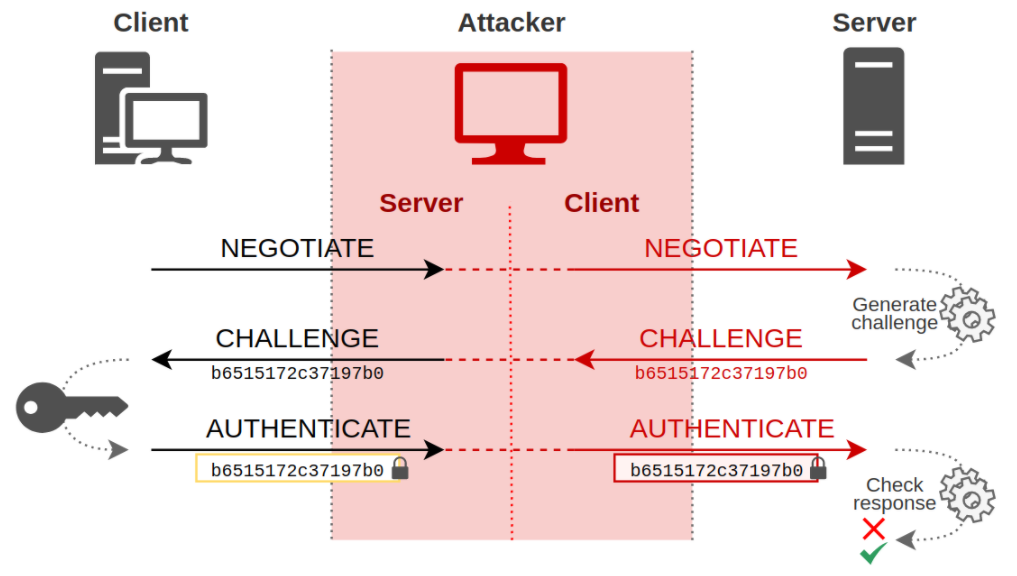
The attacker is authenticated on the server with the client’s credentials. Therefore the attacker is allowed to inject malicious commands into this relayed session.

Reference:
Q4:
How do we prevent this attack?
A4:
Prevention technics:
- Enable SMB signing
- Enable LDAP signing:
- Disable automatic intranet detection
- Disable Windows Proxy Auto Detection
- Disable LLMNR/NBNS
Note:
- Many organizations however have legacy products or operating systems that do not support Kerberos authentication, and thus disabling NTLM would have a considerate business impact.
Reference:
Q5:
Could you attack the domain controller as well?
A5:
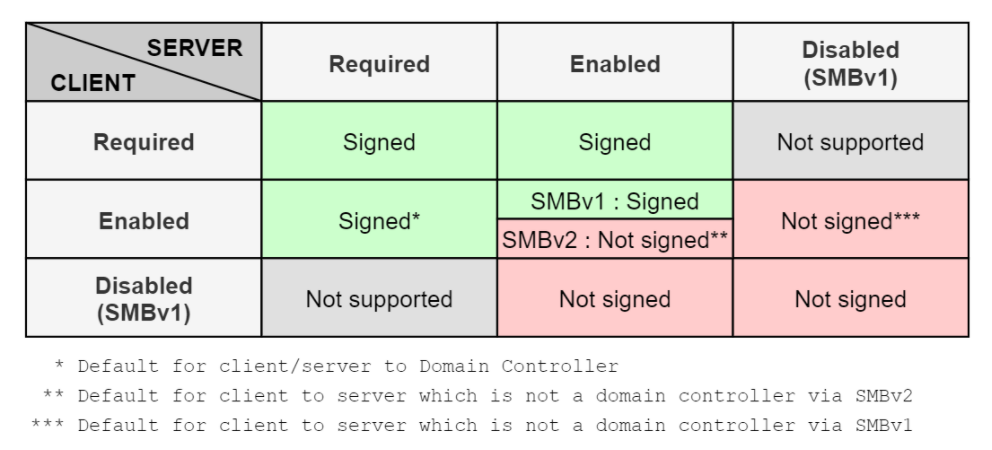
No, by default doamin controllers requires SMB signing when a client authenticates to them.
PDF Report:
Readme-Step12