

1. Introduction
DNS over HTTPS (DoH) is a protocol for performing remote Domain Name System (DNS) resolution
via the HTTPS protocol. A goal of the method is to increase user privacy and security by preventing
eavesdropping and manipulation of DNS data by man-in-the-middle attacks by using the HTTPS
protocol to encrypt the data between the DoH client and the DoH-based DNS resolver. By March of
2018, Google and the Mozilla Foundation had started testing versions of DNS over HTTPS. In
February 2020, Firefox switched to DNS over HTTPS by default for users in the United States.
After you’ve learned howto run a docker container that provides a dns over https service, please answer the following questions:
- What is the difference between interactive and detached docker daemons
- Explain the dig command that has been used in the exercise above. What
does it mean? - Is it possible to filter packets with tshark. How can you filter dns and
https packages? - What is the command for listing docker images
- What is the command for listing running docker container?
- Would it be possible running a dns tunneling attack using this approach?
explain
2. Answers and solution
- In detached mode the docker container runs in the background and you won’t see any console output. In foreground mode or interactive mode (the default when -d is not specified), docker run can start the process in the container and attach the console to the process’s standard input, output, and standard error. Screenshot below shows docker startet in interactive mode.

- >dig @localhost -p 5380 www.ost.ch
says that localhost on port 5380 should be used to resolve the host www.ost.ch. Port 5380 is the address where the docker container listens and then forward it to the cloudflare https dns resolver.

- Yes it is, but really painstaking if you’re not familiar with.
A DNS Filter can look like this:tshark -i eth0 -f "src port 53" -n -T fields -e dns.qry.name

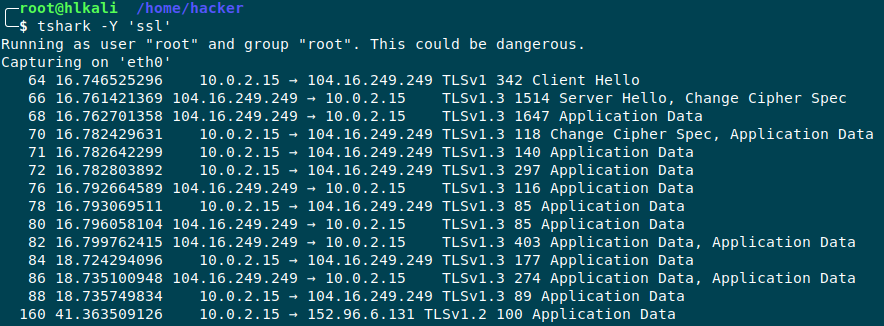
A Filter just to display SSL requests can be:
tshark -i eth0 -Y ’ssl‘

- The command to list docker images is:
docker image ls –all
-
Command to list running containers:
docker ps (See screenshot from question Nr.2)
-
If direct dns traffic is blocked, this could be an approach to resolve dns queries over https. (See dnsmasq Assignment).
I don’t have too much background info yet, how dns tunnel attacks work, but I’m happy to discuss
DNS Tunneling attacks take advantage of almost every device on the internal network behind a firewall that allows outbound access to resolve DNS requests. One of the reasons DNS Tunneling attacks work is that organizations often do not filter those outbound DNS requests.
The attack itself adds malicious payloads and commands to a trusted DNS. Additionally,compromised hosts don’t actually need external Internet access to be attacked. If they simply have access to internal DNS servers, and if those internal DNS servers have access to the Internet, in some cases this is enough to enable the machine to receive DNS responses with malicious data. This means attacks to machines that are normally considered to be “air gapped,” but still allow DNS queries to a DNS server with external access, may be vulnerable to this type of attack.
Source: https://www.fortinet.com/blog/threat-researchinto-the-rabbit-hole-offensive-dns-tunneling-rootkits
Additional Information for tshark filters:
tshark -f "port 53 or port 443" (capture filter)
tshark -Y "http||dns" (display filter)
PDF Report:
docker_dns#1