

1. Task description
After you’ve learned some techniques of Passive Fingerprinting your task is to write a report of your findings against the target https://www.compass-security.com. Please note that you only use passive techniques and do not scan or actively penetrate the target, their products and services. Your report should include the methodology you’ve used and the following informations:
-
list of hostnames and ip addresses of Compass Security
-
list of domains owned by Compass Security
-
list of providers and their ASN (BGP)
Bonus: -
(mail adresses used by company Compass Security)
2. Methodology and Results
First I’ll use dig to find the ip adresses, name servers and mail servers of the domain https://compass-security.com and https://compass-security.ch
dig compass-security.ch + short
80.74.140.119
dig compass-security.com + short
80.74.140.133
dig compass-security.ch -t ns +short
ns2.compass-security.com
ns1.compass-security.com
dig compass-security.com -t ns +short
ns2.compass-security.com
ns1.compass-security.com
dig compass-security.ch -t mx +short
mx2.compass-security.com
mx1.compass-security.ch
dig +short +answer ns1.compass-security.com
193.135.215.40
dig +short +answer ns2.compass-security.com
80.74.140.181
dig +short +answer mx1.compass-security.com
193.135.215.41
dig +short +answer mx2.compass-security.com
62.2.85.154
2.1 List of hostnames and ip addresses of Compass Security
- compass-security.ch –> 80.74.140.119
- compass-security.com –> 80.74.140.133
- ns1.compass-security.com –> 193.135.215.40
- ns2.compass-security.com –> 80.74.140.181
- mx1.compass-security.com –> 193.135.215.41
- mx2.compass-security.com –> 62.2.85.154
To get a list of domains owned by compass-security I did install the tool reconspider from the following github source:
https://github.com/bhavsec/reconspider
As I’ve learned in previous exercises I’ll create a virtual python environment for that:
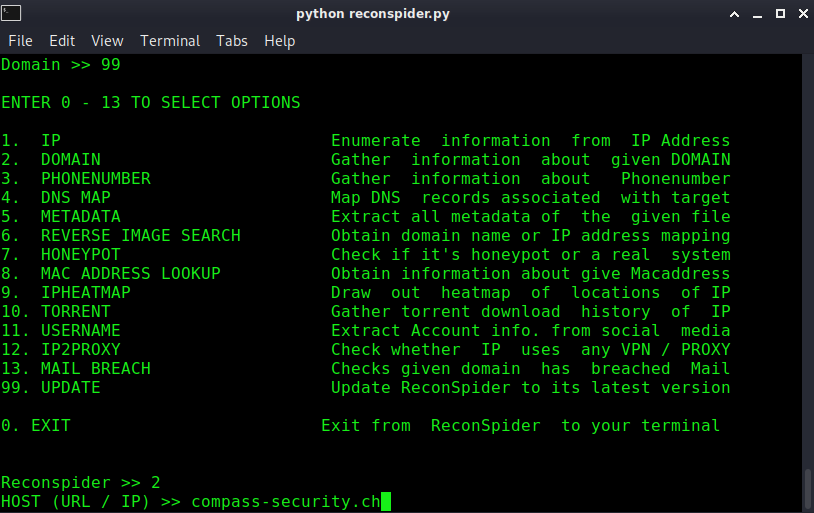
After entering the URL compass-security.ch I get a new menu and select the ReverseIP module:
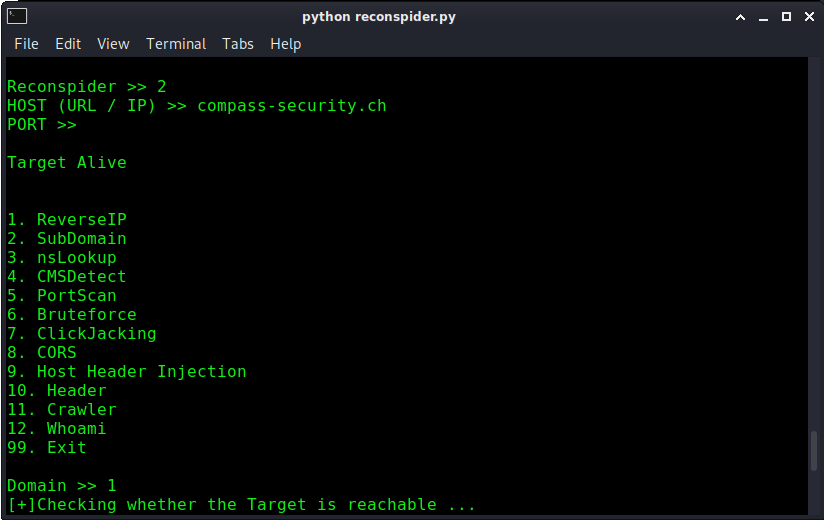
2.2 List of Domains owned by Compass-Security
Reconspider give me the following list of domains back:
>
- badger.ch
- challenges.hacking-lab.com
- compass-cyber-defense.com
- compass-security-cyber-defense.com
- compass-security.at
- compass-security.berlin
- compass-security.ch
- compass-security.co.uk
- compass-security.de
- compass-security.eu
- compass-security.fr
- compass-security.gmbh
- compass-security.info
- compass-security.it
- compass-security.li
- compass-security.net
- compass-security.org
- compass-security.sg
- compass-security.swiss
- compass-security.us
- crl.compass-security.com
- cscd.ch
- csnc.at
- csnc.ch
- csnc.de
- cyber-defense.ch
- cyber-tycoons.com
- cyber-tycoons.org
- eucsc.hacking-lab.com
- filebox-solution.de
- fileboxsolution.ch
- fileboxsolution.com
- hacking-lab-ctf.com
- media.compass-security.com
- media.hacking-lab.com
- penetrationtest.ch
- security-competence.ch
- securitycompetence.ch
- sicherheitstest.ch
- tiger-team.ch
- tigerteam.ch
- urb80-74-140-119.ch-meta.net
2.3 Further DNS enumeration
Further DNS enumeration can be done via Certification Transparency (https://cert.sh)
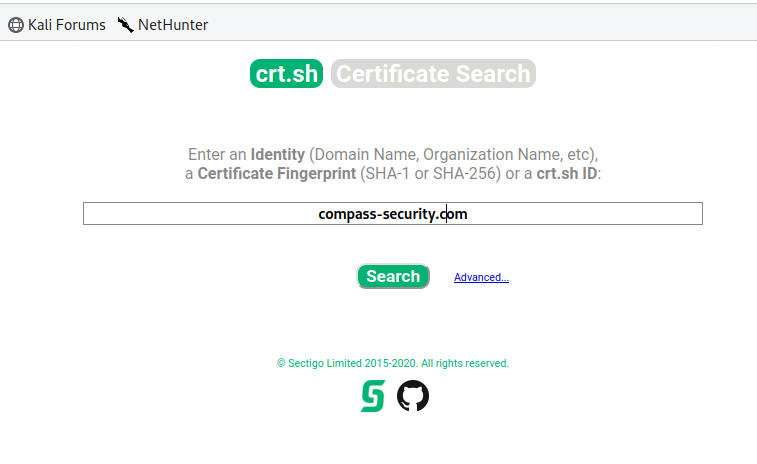
I copy the results and putting them in CyberChef with the modules Extract domains and unique. This give me the following list of domains:
>
secure.compass-security.com
www.digicert.com
pbx.compass-security.com
analytics.compass-security.com
media.compass-security.com
feedback.compass-security.com
crl.compass-security.com
deli.compass-security.com
osiris.compass-security.com
compass-security.com
www.compass-security.com
blog.compass-security.com
res.compass-security.com
fb.compass-security.com
dfir.compass-security.com
apps.compass-security.com
mx1.compass-security.com
mx2.compass-security.com
mimir.compass-security.com
openshift.compass-security.com
apps.openshift.compass-security.com
git.openshift.compass-security.com
grobi.compass-security.com
wodan.compass-security.com
osiris2.compass-security.com
2.4 Identify providers and their ASN (BGP)
>
╭─ ~/Desktop/Exercise3/OSINT ✔
╰─ whois -h riswhois.ripe.net ‚80.74.140.133‘ | egrep -i "origin|desc"
% IPv4 or IPv6 address to origin prefix match
origin: AS21069
descr: ASN-METANET METANET AG, CH
>
╭─ ~/Desktop/Exercise3/OSINT ✔
╰─ whois -h riswhois.ripe.net ‚80.74.140.119‘ | egrep -i "origin|desc"
% IPv4 or IPv6 address to origin prefix match
origin: AS21069
descr: ASN-METANET METANET AG, CH
>
╭─ ~/Desktop/Exercise3/OSINT ✔
╰─ whois -h riswhois.ripe.net ‚80.74.140.181‘ | egrep -i "origin|desc"
% IPv4 or IPv6 address to origin prefix match
origin: AS21069
descr: ASN-METANET METANET AG, CH
>
╭─ ~/Desktop/Exercise3/OSINT ✔
╰─ whois -h riswhois.ripe.net ‚193.135.215.40‘ | egrep -i "origin|desc"
% IPv4 or IPv6 address to origin prefix match
origin: AS3303
descr: SWISSCOM Swisscom (Schweiz) AG, CH
>
╭─ ~/Desktop/Exercise3/OSINT ✔
╰─ whois -h riswhois.ripe.net ‚193.135.215.41‘ | egrep -i "origin|desc"
% IPv4 or IPv6 address to origin prefix match
origin: AS3303
descr: SWISSCOM Swisscom (Schweiz) AG, CH
>
╭─ ~/Desktop/Exercise3/OSINT ✔
╰─ whois -h riswhois.ripe.net ‚62.2.85.154‘ | egrep -i "origin|desc"
% IPv4 or IPv6 address to origin prefix match
origin: AS6830
descr: LibertyGlobal Liberty Global B.V., AT
origin: AS6830
descr: LibertyGlobal Liberty Global B.V., AT
2.5 Search for mail adresses used by company compass security
I’ve tried the search engine https://hunter.io for that. Before you can search you’ve to register and you can’t unlock all results. For an attacker this can be interessting to find potentially usernames and email adresses.

>
jan-tilo.kirchhoff@compass-security.com
patrick.vananti@compass-security.com
ivan.buetler@compass-security.com
cyrill.brunschwiler@compass-security.com
sylvain.heiniger@compass-security.com
alessandro.zala@compass-security.com
stephan.sekula@compass-security.com
nicolas.heiniger@compass-security.com
daniel.schenker@compass-security.com
karin.bamert@compass-security.com
PDF Report:
OSINT#1