

1. Introduction
- At the RatherInsecure Bank, a USB Stick is used to import account data into the core banking system.
- The employee in charge of the import left the USB Stick unattended for several days.
- Shortly after the next import, a customer complained that money was missing from his account with number 222222222.
- It was quickly determined, that customer Adams somehow gained access to the account. The current assumption is, that a new file was created on the USB Stick, which was wrongfully imported. It is unclear when this happened.
- Another analyst has already created an image of the found stick using dd and made it available to you under RESOURCES.
Your task is to:
- Analyze the data on the USB Stick. Describe what files were created directly on the usb stick and which ones were probably moved (volume move) there.
- Describe two different time anomalies that are observed while analyzing the USB Stick.
- Determine what file timestamps were tempered with.
- Determine the real time the file NewestAccounts.txt was created / last modified
2. Linux analysis
Mount dd image in read only mode
mount -o ro,loop,show_sys_files,streams_interface=windows timestomping.dd /mnt/usb_disk2
ls -lia
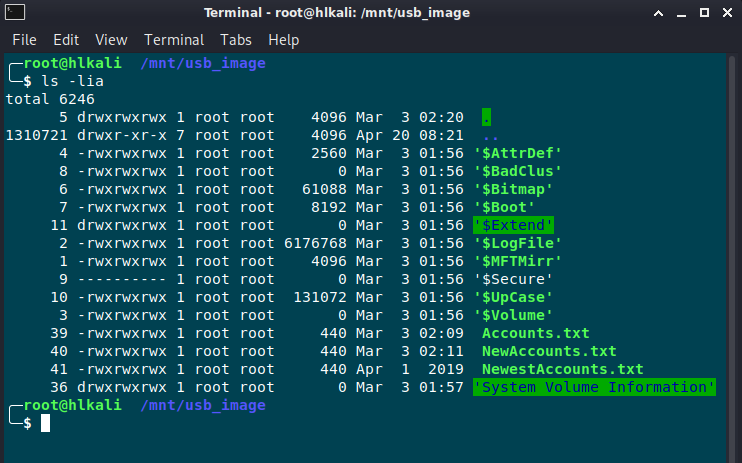
Here we can see the first anamoly. The inode number / file id usually roughly aligns with the time when a file is created.
Notice, how the file NewestAccounts.txt has an inode number of 41 but is created significantly earlier (Apr 1 2019) than other files on the device!
Let’s have a closer look on the timestamp:
ls- full-time
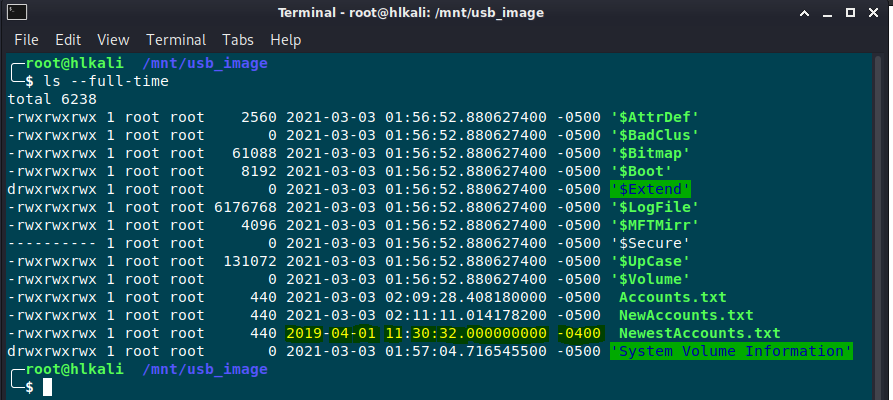
It is highly unlikely that a file ever has a millisecond timestamp of zero on an NTFS filesystem.
- However, the file NewestAccounts.txt does have such a zero millisecond timestamp (000000000 in 17:30:32.000000000).
- This is a very direct indication towards the presence of timestomping.
- Furthermore, the timestamp is created from another timezone than the other files present on the drive. This is indicated by the offset -0400 (instead of -0500).
For the next analysis I’ll use the sleuth kit
fls -r ./timestomping.dd | grep ‚NewestAccounts‘

Use istat to determine the timestamps of the MFT for the according file:
╭─ ~/Desktop/Exercises/10 - Forensics/Timestomping                           ✔
╰─ istat ./timestomping.dd 41-128-1
MFT Entry Header Values:
Entry: 41        Sequence: 1
$LogFile Sequence Number: 2113362
Allocated File
Links: 1

$STANDARD_INFORMATION Attribute Values:
Flags: Archive
Owner ID: 0
Security ID: 264  ()
Created:    2019-04-01 11:30:32.000000000 (EDT)
File Modified:  2019-04-01 11:30:32.000000000 (EDT)
MFT Modified:   2021-03-03 02:25:24.535884000 (EST)
Accessed:   2019-04-01 11:30:32.000000000 (EDT)

$FILE_NAME Attribute Values:
Flags: Archive
Name: NewestAccounts.txt
Parent MFT Entry: 5     Sequence: 5
Allocated Size: 0       Actual Size: 0
Created:    2021-03-03 02:20:13.277008400 (EST)
File Modified:  2021-03-03 02:20:13.277008400 (EST)
MFT Modified:   2021-03-03 02:20:13.277008400 (EST)
Accessed:   2021-03-03 02:20:13.277008400 (EST)

Attributes:
Type: $STANDARD_INFORMATION (16-0)   Name: N/A   Resident   size: 72
Type: $FILE_NAME (48-2)   Name: N/A   Resident   size: 102
Type: $DATA (128-1)   Name: N/A   Resident   size: 440
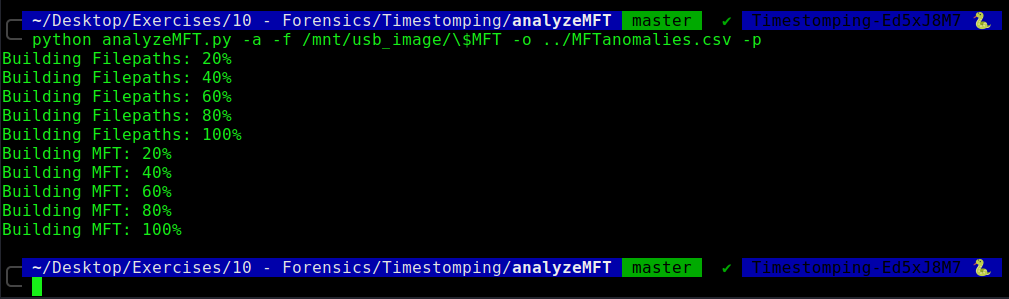
There is another tool called analyzeMFT.py
I’ll start it in a python2 environment
python analyzeMFT.py -a -f /mnt/usb_image/\$MFT -o ../MFTanomalies.csv -p
3. Windows analysis
On the windows side I use FTK Imager to mount the dd image

I extract the $MFT file and do a further analysis with the forensic tool MFTECmd.exe

With TimelineExplorer we can the I load the generated CSV File and search for further anomalies.

The file NewAccounts.txt was probably moved to the USB Stick

For the modification of the timestamps, please have a look on the output from istat above.