

Exercise – HTTP and HTTPS MitM Apache Reverse Proxy
1. Introduction
This exercise is explaining the so-called online phishing attack. We want to learn how to setuphttp/https listener, that is forwarding everything to the target webserver. We want to create a http and https listener and both shall forward to the backend system.

After you did successfully setup your docker reverse proxy, please write a short report and answering the
following questions:
- Explain the steps you did in the exercise
- Explain the benefit of having a http to https reverse proxy
- Explain the benefit of having a https to https reverse proxy
- Explain how your reverse proxy online phishing could be advertised to a
victim- within the same network (LAN)
- over the internet
2. Answers
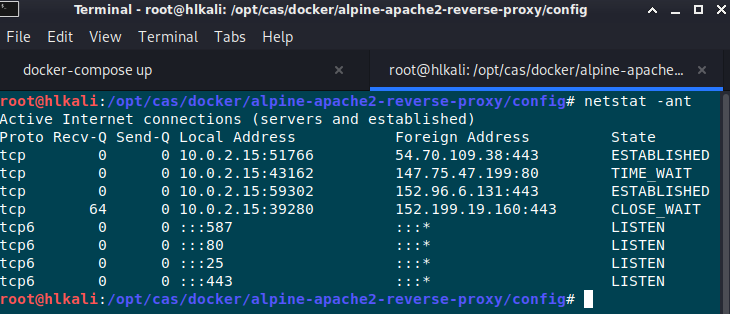
- The docker setup did create a local listener on port 80 and 443. All incoming requests onlocalhost for port 80 and 443 will be forwarded to another localhost apache webserver within thedocker.
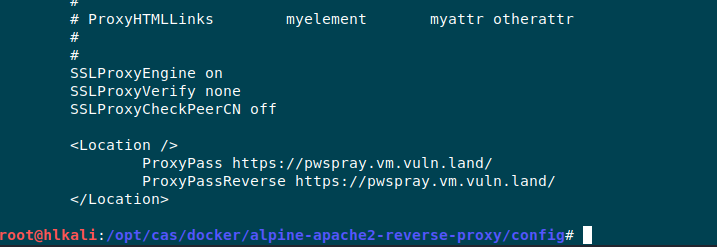
By changing the proxy-html.conf we can forward the traffic to any another destination we want. In this case it’s the pwspray-server that we know allready from another exercise.
Summarized answer for question 2. and 3.
General thougts about benefits of having a reverse proxy from a security perspective
-
Load balancing:
The only server visible to the internet is the reverse proxy. It will redirect the traffic to different
internal servers and can also act as failover. -
Reverse proxy is ssl gateway:
You can communicate via http behind the firewall. -
DDOS protection:
Protecting the server’s IP address means attackers can only target the reverse proxy and not the systems and services behind it.
Answer for question 4:
On a local network you can try a dns poisoning attack with ettercap.
https://medium.com/bugbountywriteup/how-i-pranked-my-friend-using-dns-spoofing-6a65ff01da1
You can wait until the victim types the destination URL (Example from the link above *.facebook.com) or send a mail that contains the DNS name of the target server.
If you’re not in the same network you need a domain and VPS Server where the mitm proxy is running. In most cases the attacker will prepare a mail that contains a link to his attacker domain which looks typically like the orignial domain.

3. Interessting Project
While doing some research I did stumble accross an interessting project on github:
https://github.com/drk1wi/Modlishka
Modlishka is a powerful and flexible HTTP reverse proxy. It implements an entirely new and interesting approach of handling browser-based HTTP traffic flow, which allows to transparently proxy multi-domain destination traffic, both TLS and non-TLS, over a single domain, without a requirement of installing any additional certificate on the client. What does this exactly mean? In short, it simply has a lot of potential, that
can be used in many use case scenarios…
From the security perspective, Modlishka can be currently used to:
Support ethical phishing penetration tests with a transparent and automated
reverse proxy component that has a universal 2FA “bypass” support.
Automatically poison HTTP 301 browsers cache and permanently hijack non-TLS
URLS. Diagnose and hijack browser-based applications HTTP traffic from the
"Client Domain Hooking" attack perspective.
Wrap legacy websites with TLS layer, confuse crawler bots and automated
scanners, etc.
Modlishka was written as an attempt overcome standard reverse proxy limitations and as a personal
challenge to see what is possible with sufficient motivation and a bit of extra research time. The achieved
results appeared to be very interesting and the tool was initially released and later updated with aim to:
Highlight currently used two factor authentication (2FA) scheme weaknesses,
so adequate security solutions can be created and implemented by the industry.
Support other projects that could benefit from a universal and transparent reverse proxy.
Raise community awareness about modern phishing techniques and strategies
and support penetration testers in their daily work.
PDF Report
reverse_proxy#1