

1. Task Decription
Nmap (Network Mapper) is a free and open-source network scanner which is used to discover hosts and
services on a computer network by sending packets and analyzing the responses.
Nmap provides a number of features for probing computer networks, including host discovery and service and
operating system detection. These features are extensible by scripts that provide more advanced options.
After you did some practice exercises with nmap, please answer the following questions:
- which host(s) are vulnerable for the EternalBlue vulnerability?
- what is the nmap command for a full tcp scan?
- what is the nmap command for a syn scan?
- what is the nmap command for a half-open scan?
- how do you find out the OS version of your targets?
- explain the idea/purpose of the nmap scripting engine?
- list every nmap script you could use in your nmap scan?
- during the running nmap scan; how can you access the nmap stats (of a
running scan)?
2. Answers and Solution
nmap -n -Pn -p 445 --script smb-vuln-ms17-010 -iL targets.txt -oA nmap_script_eternalblue

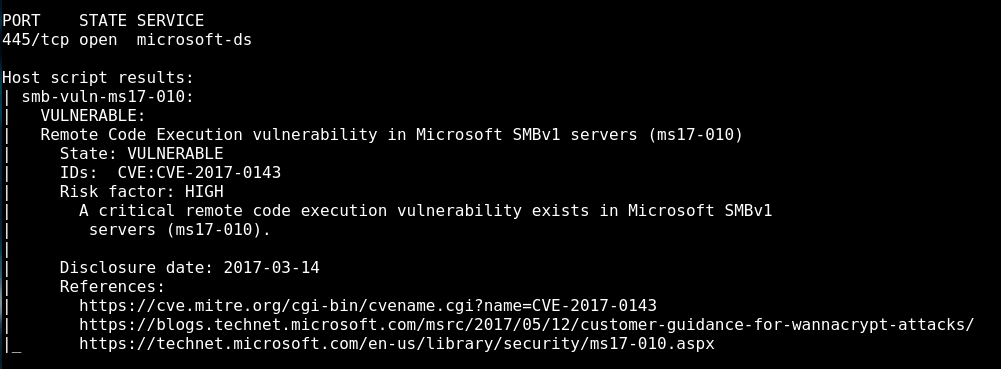
The vulnerable host is 152.96.6.249
-
A full tcp scan can be done with the following command: (also known as TCP connect scan)
nmap -sT -iL targets.txt -
A syn scan can be done with the following command:
nmap -sS -iL targets.txt
- It’s the syn scan and it can be done with the command above.
A TCP Half Open Scan determines if a port is open by performing the first half of a three-way
handshake. It is also referred as the SYN scanning. In SYN scanning, the hostile client or
attacker attempts to set up a TCP/IP connection with a server at every possible port. This is
done by sending a SYN (synchronization) packet, as if to initiate a three-way handshake, to
every port on the server.
- OS Detection can be done with the following command:
nmap -O -iL targets.txt
The command line switch -A detect OS and services.
-
The idea behind the nmap scripting engine is to expand the functionality of nmap as a good security
scanner. The scripts are able to perform a wide range of security related testing and discovery
functions. -
To locate the nse scripts I use the following command in terminal:
locate nse | grep script
This give me about 600 scripts back. (I did count that with cyberchef)

- It’s by entering the return key

3. Further Learnings
I didn’t know awk before. Really cool 🙂
https://www.geeksforgeeks.org/awk-command-unixlinux-examples/
PDF Report
nmap_scanning#1