

Lab: Maintaining Access
Step 3 – Situational Awareness & Privilege Escalation on Windows 10 Client
Teamwork – Team DaMa
1. Introduction
In this challenge we will start with user priviledges on a Windows 10 client with the goal to escalate our
priviledges to local admin.
Please write a short PDF report that includes screenshots of the major steps of the attack (at least the finalstep) and answer the following questions:
- Explain the vulnerability you used for privilege escalation.
- Can you use the new user account to log on to another machine and why?
- Explain if the cmd.exe was started in an elevated context and how you can tell that from the output of
whoami /groups? - If yes, explain how you “bypassed” UAC?
- How can you prevent such an attack?
2. Answers
-
On the target win10 Client a policy called AlwaysInstallElevated is set to 1. Any user can install msi packages with elevated system priviledges which is equivalent for granting full administrative
rights and a massive security risk! The registry hives are located under:HKEY_CURRENT_USER\Software\Policies\Microsoft\Windows\Installer
HKEY_LOCAL_MACHINE\Software\Policies\Microsoft\Windows\Installer

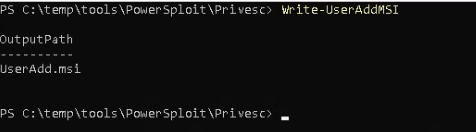
Powersploit was able to detect that issue and start a msi installer which puts the user backdoor to the local admin group.

-
Login to another machine is not possible yet, because we only elevated our priviledges on the local
machine. -
With local admin priviledges we are allowed to start cmd.exe in an elevated context.
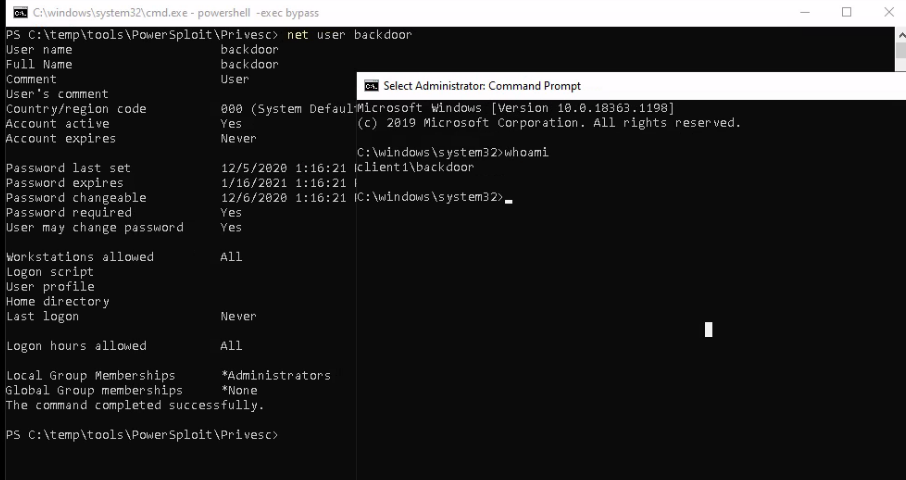
With the command whoami /groups we can see a flag called Mandatory Label\High Mandatory Level.

If we are on High mandatory Level we run cmd.exe in elevated context. Let’s compare that, by running cmd.exe in user context.

As you can see on the window behind the flag is set to Medium Mandatory Level.
-
It’s not really a bypass. We just used the admin credentials from our freshly created user backdoor.
By playing a little bit we could find out another cool trick. With the tool psexec.exe and the parameters -s -i -d followed by cmd.exe we got a cmd prompt running under local system priviledges!

- First mitigation in this case is to disable the AlwaysInstallElevated Registry hive. For further
advises howto prevent UAC bypass attacks, we will reference to an article from fortinet. [1]
3. Further Ressources
[1] https://www.fortinet.com/blog/threat-research/offense-and-defense-a-tale-of-two-sides-bypass-uac
PDF Report
Step3