1. Introduction
- An incident happened at ACME Corp. and your team was tasked with the incident response and remediation.
- It was quickly determined that the attacker had dropped several files on the disk of the patient zero.
- The IT Departement of ACME Corp does their best to provide access to the required resources, however until now there is no access and you were only able to obtain a copy of all files within the System32 directory.
Answer the following questions:
- What files are out of place?
- Why are said files out of place?
- How did you do your analysis?
2. Answers
After unzip the files and order the coloumns by Date modified / Date created and Date accessed I couldn’t see any anomalies yet.

(Date created and Date accessed seems to be the timestamp from my file extract)
If I have a closer look on the date modidied timestamp, there are several files from 07.02.21. The file svcchost.exe looks very suscpiscious for me!
For a further analysis I’ll use sigcheck
https://docs.microsoft.com/en-us/sysinternals/downloads/sigcheck
Sigcheck is a command-line utility that shows file version number, timestamp information, and digital signature details, including certificate chains. It also includes an option to check a file’s status on VirusTotal, a site that performs automated file scanning against over 40 antivirus engines, and an option to upload a file for scanning
sigcheck.exe -e -c -w sigcheck.csv "C:\Forensics\System32Anomalies\System32"

The csv output can then be analysed with Timeexplorer, a tool that I’ve already used in the timestomping exercise.
I’ll set the following filters:
- unsigned
- not equal to Microsoft Corporation

Findings:
- curl.exe (curl, https://curl.haxx.se)!
- MdScan.exe (Sojaner)!
- psexec.exe (Signed by Microsoft, but no default binary!)

!
If I set a filter for 32-bit and remove the unsigned filter I’ll also find psexec. It can be a very useful tool for administrator, but it will also often used by attackers!

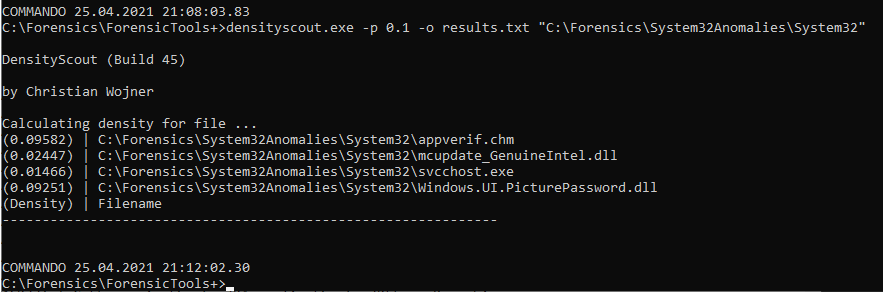
The last tool I’ll use is densityscout
https://www.cert.at/en/downloads/software/software-densityscout
This tool calculates density (like entropy) for files of any file-system-path to finally output an accordingly descending ordered list. This makes it possible to quickly find (even unknown) malware on a potentially infected Microsoft Windows driven machine.
densityscout.exe -p 0.1 -o results.txt "C:\Forensics\System32Anomalies\System32"