

Assignment Series #A2 Traceroute
1. Introduction
The Linux command traceroute shows how data transmission travelled from a local machine to a remote one.
A typical example would be loading a web page over the internet that involves data flowing through a network
and a number of routers. The traceroute command can show the route taken and the IP and hostnames of
routers on the network. It can be useful for understanding latency or diagnosing network issues.
After getting familar with the command traceroute, please list and run the following traceroute commands:
- traceroute icmp www.ost.ch
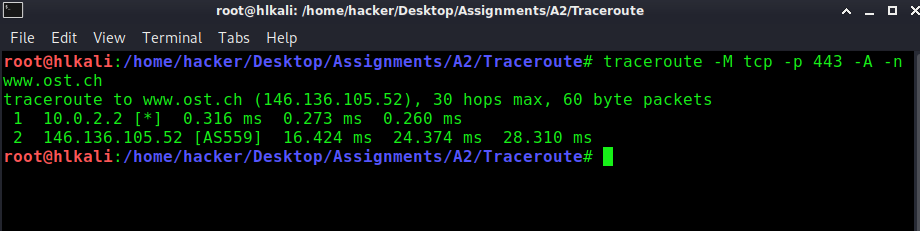
- traceroute tcp port 443 www.ost.ch with ASN resolution and disabled dns resolution
- traceroute udp port 53 for ns1.compass-security.com and ns2.compass-security.com
2. Solution
-
Syntax of traceroute command is:
traceroute -M icmp www.ost.ch

-
Syntax of traceroute command is:
traceroute -M tcp -p 443 -A -n www.ost.ch
-
Syntax of traceroute command is:
traceroute -M udp -p 53 ns1.compass-security.com
traceroute -M udp -p 53 ns2.compass-security.com

3. Command Switches and Comments
-M protocol
-p port
-A with ASN resolution
-n with disabled dns resolution
www.ost.ch is blocking icmp requests

hop Nr. 10 is the last answer before the firewall
10 swiBU2-10GE-1-5.switch.ch (130.59.37.113) 58.086 ms 58.309 ms 57.991 ms
Just a short repetition from the OSINT exercise howto get the ASN and compare it with the traceroute output:
╭─ ~/Desktop/Assignments/A2/Traceroute ✔
╰─ dig +short www.ost.ch
web02.ost.ch.
146.136.105.52
╭─ ~/Desktop/Assignments/A2/Traceroute ✔
╰─ whois -h riswhois.ripe.net ‚146.136.105.52‘| egrep -i "origin|desc"
% IPv4 or IPv6 address to origin prefix match
origin: AS559
descr: SWITCH SWITCH, EU
╭─ ~/Desktop/Assignments/A2/Traceroute ✔
╰─
Instead of using traceroute -M udp -p 53, I can also use traceroute -U which give me the same
result.
PDF Report
traceroute#1